Understanding Credits
Understanding Credits
Narralyn uses a simple pay-as-you-go credit system. No subscriptions, no monthly fees - just buy credits when you need them.
How Credits Work
Credits are Narralyn's currency. You use credits to:
- Transcribe audio with AI (uses credits)
- Edit transcriptions (free - no credits used!)
- Export edited audio (free - no credits used!)
Key Point: Credits are only charged for AI transcription. Everything else is free.
Credit Pricing
Credits are charged per minute of audio:
- 1 credit = 1 minute of audio transcription
- Duration is rounded up to the nearest minute
Examples:
- 1:00 audio = 1 credit
- 1:01 audio = 2 credits (rounded up)
- 5:30 audio = 6 credits (rounded up)
- 15:00 audio = 15 credits
Credit Packages
Narralyn offers early adopter pricing with lifetime rates:
| Package | Credits | Price | Transcription Hours |
|---|---|---|---|
| Starter | 400 credits | $12 | ~6.7 hours |
| Pro ⭐ | 900 credits | $25 | ~15 hours |
| Premium | 2100 credits | $50 | ~35 hours |
Early Adopter Guarantee: Lock in these rates forever. When prices increase for new users, you keep your early adopter pricing.
Free Credits
Every new account receives 5 free credits to try Narralyn:
- Test the transcription quality
- Try the word-level editor
- Export a sample project
- No credit card required to start
Checking Your Balance
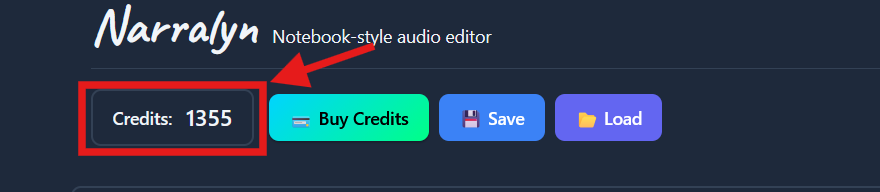
Your credit balance is displayed in the top left of the editor screen:
- Always visible while editing
- Click to buy more credits
- Updates after each file is processed
When Are Credits Charged?
Credits are charged immediately when transcription completes successfully:
✅ Charged When:
- AI transcription completes successfully
- You can see your transcript in the editor
- File was processed without errors
❌ NOT Charged When:
- Upload fails (file too large, wrong format)
- Processing errors occur (corrupt file, unsupported codec)
- You're just editing or exporting
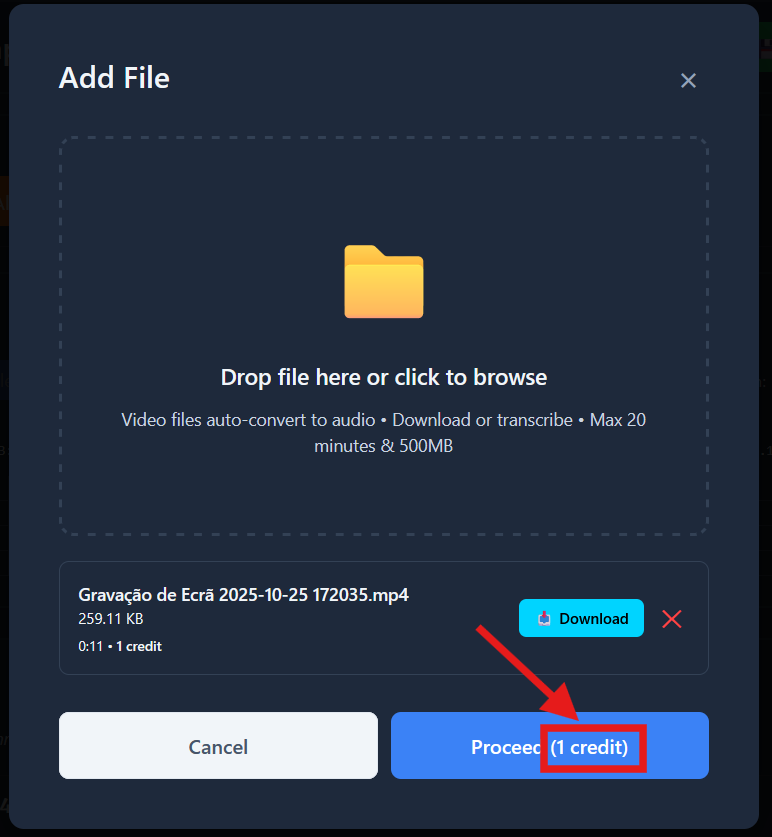
Pro-tip: Before you proceed editing a file, the "Proceed" button in the "Add File" pop-up indicates the cost in credits of the operation.
What If I Run Out?
If you do not have enough credits, the audio transcription will not proceed:
- Upload will fail with "Insufficient credits" error
- No credits are deducted (transcription didn't occur)
- Buy more credits and try again
Pro Tip: Buy credits in bulk (Premium package) for the best value if you're processing files frequently.
Refund Policy
Credits are non-refundable, but we're fair:
- If transcription fails due to our error, credits are not deducted
- If you upload the wrong file, delete it before transcription (no charge)
- Corrupt or unsupported files don't consume credits
Credit Expiration
Credits never expire. Buy them once, use them whenever.
Common Questions
Q: Can I get a subscription instead? A: No, Narralyn is pay-as-you-go only. This ensures you only pay for what you use.
Q: Do credits expire? A: No, credits are yours forever.
Q: Can I share credits with my team? A: Not yet. Each account has its own credit balance. Team features are coming soon.
Q: Is there a free tier? A: Yes! You get 5 free credits when you sign up. After that, you must purchase credits to keep using Narrallyn.
Q: Do edits and exports cost credits? A: No! Only AI transcription costs credits. Edit and export as much as you want - it's free.
Maximizing Your Credits
Tips to Save Credits:
- Trim videos first: Remove unnecessary intro/outro before uploading
- Check file duration: 1:01 = 2 credits (rounds up), so trim that 1 second!
- Buy in bulk: Premium package ($50) gives you the best value with 2100 credits (~35 hours)
Next Steps
👉 Understanding the Editing UI - Once you've uploaded and transcribed a file, learn how to navigate the editor
👉 Upload Your First File - Ready to try? Upload your first file and use those free credits!
Need to buy credits? Log in to app.narralyn.com and click "Buy Credits" in the top left.